Introduction
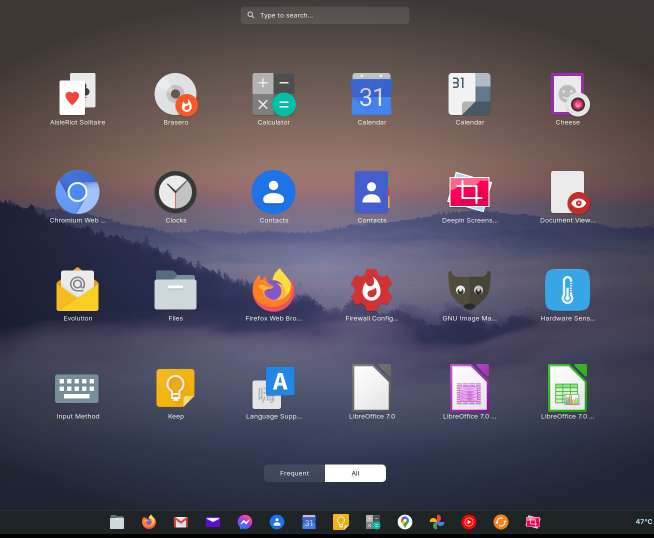
Zorin OS, a user-friendly Ubuntu-based Linux distribution, comes equipped with a curated selection of pre-installed applications designed to provide an out-of-the-box experience similar to Windows or macOS. As of Zorin OS 18 (released in October 2025), the focus is on essential productivity, multimedia, and system tools, with expanded collections in Pro and Education editions. 0 1 While the Core edition includes a baseline set of apps, Pro adds professional-grade software (valued at over $5,000 in alternatives), and Education incorporates learning-focused tools. 5 14 This guide lists all important apps – pre-installed essentials, edition-specific additions, and key recommendations from the Software Store – with descriptions, based on official sources and release notes as of October 17, 2025. Apps are categorized for clarity, and all are open-source unless noted.
Zorin OS emphasizes compatibility, so many apps support Microsoft Office formats, Windows .exe files via WINE, and web-based tools through the new Web Apps feature. 2 9 You can install thousands more via the built-in Software Store (APT, Flatpak, Snap repositories). 12
Core Pre-Installed Apps (All Editions)
These form the foundation across Core, Lite, Pro, and Education editions, ensuring immediate usability for everyday tasks. 2 16
Productivity and Office
- LibreOffice Suite (Writer, Calc, Impress, Draw, Base): Full-featured office suite for documents, spreadsheets, presentations, vector graphics, and databases. Fully compatible with Microsoft Office/365 formats; pre-installed for seamless file handling. 2 9
- Zorin Appearance: Desktop customization tool for switching layouts (e.g., Windows 11, macOS, Ubuntu) and themes. Includes wallpaper management and visual tweaks. 16
Web and Communication
- Brave Browser: Privacy-focused web browser with built-in ad-blocker and tracker protection. Default since Zorin OS 17; supports Web Apps for turning sites like Gmail or Microsoft 365 into desktop apps. 1 5
Multimedia and Creativity
- Rhythmbox: Music player for organizing and playing audio libraries, with podcast support and plugin extensibility.
- Shotwell: Photo organizer and editor for importing, tagging, and basic editing of images.
- GNOME Text Editor: Simple, modern text editor for notes and code snippets.
System and Utilities
- Software Store (GNOME Software): Centralized app manager for discovering, installing, and updating apps from Ubuntu repositories, Flathub, and Snap. Includes search for Windows alternatives (e.g., suggests LibreOffice for MS Word). 12 16
- Zorin Connect: Syncs notifications, files, and controls between your PC and Android devices over local network. Features encrypted connections for media remote and slideshow control. 14 16
- Files (Nautilus): Default file manager with global search, OneDrive integration, and cloud sync support. 11
- PipeWire: Audio server for enhanced sound quality, low-latency recording, and compatibility with professional tools. 11
Accessibility
- GNOME Accessibility Tools: Includes Orca (screen reader), Magnifier, Click Assist, and high-contrast themes. Supports over 100 languages. 2 16
Pro Edition Exclusive Apps
Zorin OS Pro (£48 one-time) includes an expanded library of professional tools, pre-installed for productivity, creativity, and collaboration. These are FOSS alternatives to commercial software, totaling gigabytes of Flatpaks. 1 5 14
Advanced Productivity
- Deskflow (Synergy Alternative): Shares mouse, keyboard, and clipboard across multiple computers (Windows/Linux/macOS).
- Warp: Secure file transfer tool for teams, with end-to-end encryption.
- Valot: Time-tracking app for logging work hours and generating reports.
Audio and Video
- EasyEffects: Professional audio equalizer and effects processor for real-time tweaks (e.g., bass boost, noise reduction).
- Kdenlive: Non-linear video editor for cutting, effects, and 4K exports.
- Ardour: Digital audio workstation (DAW) for recording, mixing, and mastering tracks.
Graphics and Design
- GIMP: Photoshop-compatible image editor for photo retouching, compositing, and batch processing.
- Inkscape: Vector graphics editor for illustrations, logos, and SVG exports (alternative to Adobe Illustrator).
- Blender: 3D creation suite for modeling, animation, rendering, and VFX (used in Hollywood productions).
- Krita: Digital painting app with brushes, layers, and animation tools.
- FreeCAD: Parametric 3D CAD modeler for engineering designs.
- LibreCAD: 2D CAD tool for technical drawings and blueprints.
Additional Pro Tools
- Premium desktop layouts (e.g., ChromeOS, GNOME 2) via Zorin Appearance.
- Pre-installed Flatpak library for quick access to these apps.
Education Edition Exclusive Apps
Tailored for learning, Zorin OS Education adds interactive and management tools pre-installed. 0 10
Learning and STEM
- TurboWarp: Enhanced Scratch environment for block-based programming, games, and animations (up to 100x faster).
- GDevelop: No-code game development studio for creating 2D games.
- Fritzing: Electronics prototyping tool for breadboard designs and schematics.
- LibreCAD: 2D CAD for technical drawings (as above).
- Builder: IDE for building desktop apps with code editing and debugging.
- Kolibri: Offline educational content platform with lessons in math, science, and languages.
- GCompris: Suite of educational games for ages 2-10 (math, reading, logic).
- Marble: Interactive world atlas for geography and maps.
- Minetest: Open-source voxel game for building and exploration (Minecraft-like).
- Kalzium: Chemistry app for element properties and periodic table simulations.
- Stellarium: Planetarium software for stargazing and astronomy education.
- Spedread: Speed-reading trainer with exercises and progress tracking.
- Gradebook: Simple tool for tracking student performance and assignments.
Classroom Management
- Veyon: Teacher console for monitoring, controlling, and broadcasting screens across classroom devices.
- Zorin Grid: Fleet management for deploying apps, settings, and security to multiple school PCs.
Important Recommended Apps (Via Software Store)
These are not pre-installed but highly recommended for enhancing Zorin OS, often suggested for Windows migrants. 7 12 Install via Software Store for seamless integration.
Gaming and Entertainment
- Steam: Digital distribution platform for Linux-native and Windows games (via Proton).
- Lutris: Game manager for non-Steam titles, emulators, and launchers (Epic, GOG).
- Firefox: Alternative browser for enhanced privacy (installable; Brave is default). 1
Productivity Extensions
- ONLYOFFICE: MS Office-compatible suite for collaborative editing (free desktop version).
- Thunderbird: Email client for managing multiple accounts.
Development and Utilities
- VS Code: Code editor with extensions for programming.
- Synaptic Package Manager: Advanced tool for handling .deb packages (install for uninstalling pre-installed apps). 13
How to Manage Apps
- Install: Open Software Store > Search > Install (supports .deb, .AppImage files). 12
- Uninstall: Software Store > Installed tab > Remove (or use Synaptic for precision). 13
- Updates: Automatic via Software Updater; Zorin OS 18 supported until June 2029. 2
Conclusion
Zorin OS prioritizes a lean yet powerful app ecosystem, with Core providing essentials for daily use, Pro unlocking pro-level creativity, and Education fostering learning. All apps emphasize privacy, compatibility, and performance on hardware up to 15 years old. For the full experience, explore the Software Store – it’s your gateway to a vast Linux app world. If switching from Windows, Zorin detects .exe files and suggests alternatives automatically. 7 Download Zorin OS 18 from zorin.com/os/download and start customizing today.
This guide is based on information as of October 17, 2025.